This is an old revision of the document!
Table of Contents
Online Help > AlpineQuest 2.x > Maps & Layers
How to create favorite maps and sets?
The application allows you to save the configuration settings of displayed maps and layers in a favorite set, in order to restore it quickly when needed. The settings include the order of maps and layers, their opacity, contrast and saturation.
How to create a favorite configuration?
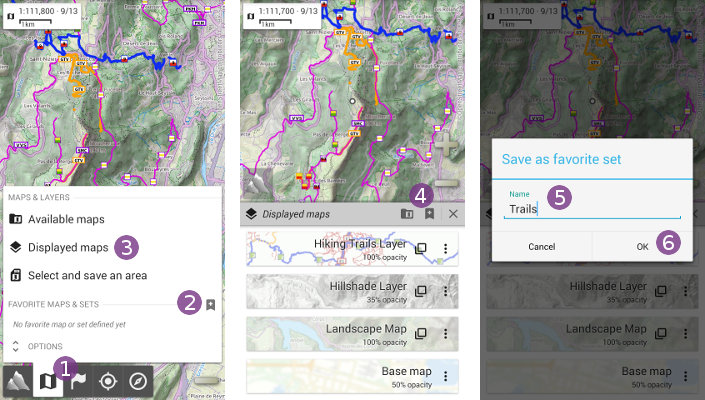
To create a favorite map or set:
- Click on the
“Maps & layers”menu ;
; - Click on the
“Save as favorite set”icon ;
; - Optionally, choose a name for your set
 , and click on
 “Ok” .
.
You can also create a favorite map or set from the displayed maps list:
- Click on the
“Maps & layers” and select “Displayed maps” ;
; - Click on the
“Save as favorite set”button ;
; - Optionally, choose a name for your set, and click on
“Ok”.
How to display or edit a favorite configuration?
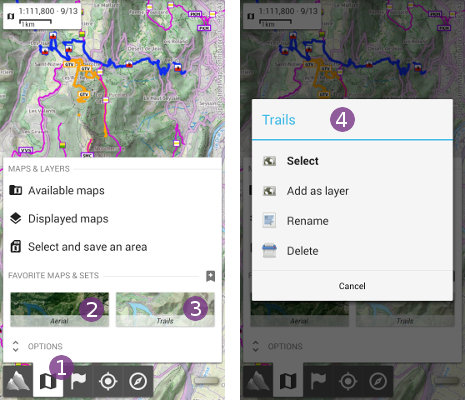
Favorite configurations are displayed in the “Maps & layers” menu, under the “Favorite maps & sets” section. To display a saved favorite configuration:
- Click on the
“Maps & layers”menu; - Click on the favorite configuration preview to display.
 To rename or delete a favorite configuration, long-press it to display it's options menu .